plantain

I’m down if you’re down.

Hang out more.

Float a plan in one line. Friends tap “I’m down” from a text, with no app and no account. If anyone’s down, it’s on. Nobody’s on the hook.

Coming to iPhoneSee how it works

Got a link from a friend? Open it in your text. That’s the whole app for you.
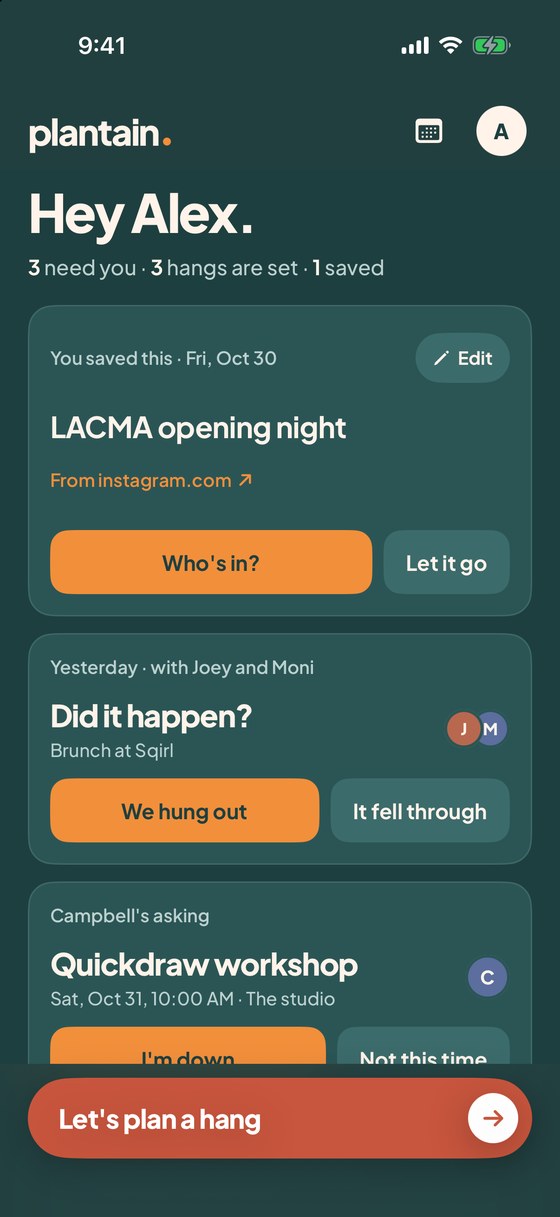
The Plantain home screen: a saved-ideas card, a did-it-happen check-in, Campbell asking about a Quickdraw workshop with I'm down and Not this time, and a big Let's plan a hang button.
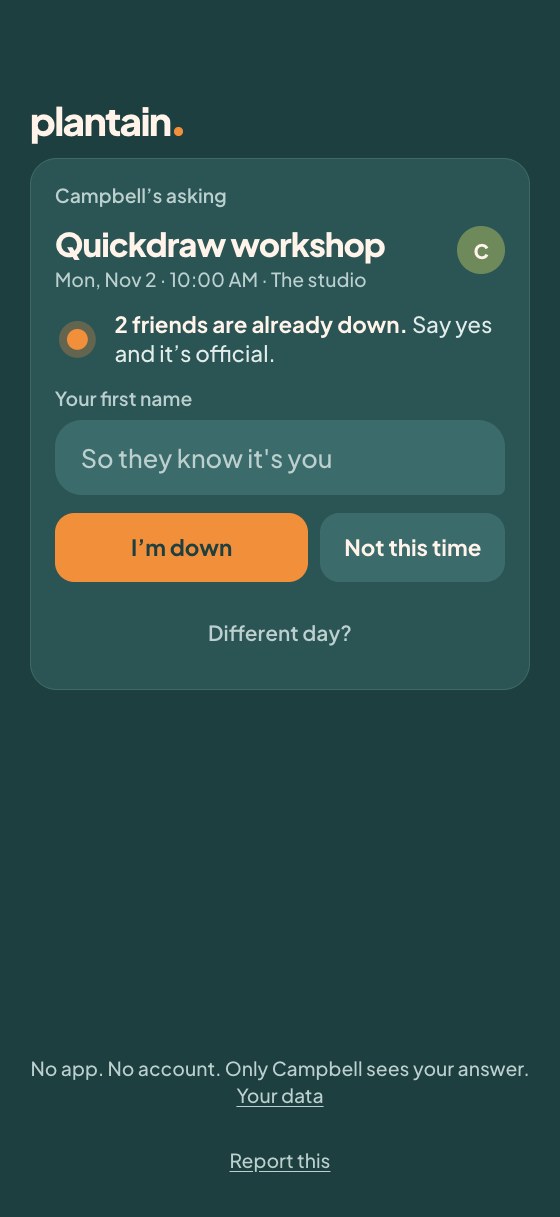
A friend's invite page: Campbell is asking about the Quickdraw workshop, two friends are already down, and there are two buttons, I'm down and Not this time.

Texting a friend feels like a big ask. Making a plan feels like work. So nobody does it, and everyone stays in.

Sound familiar?

Making plans shouldn’t feel like asking for a favor.

Here’s what Plantain does about it.

“I don’t want to be the one who always plans.”

Float it in one line and let it sit. Nobody has to say yes first, so nobody has to be the organizer.

“Fourteen messages and still no plan.”

Friends tap “I’m down” from your text. No thread to scroll and no “wait, what day?” because it’s all on the page.

“Did anyone even see it?”

See who’s down, who hasn’t answered and who you haven’t texted yet. A quiet friend gets one nudge a day later, and you choose whether to send it.

“I’m not sure I can, so I’ll say nothing.”

“Not this time” is quiet and costs nothing. Or offer another day and let the host move it with a tap.

“I’ll come back to it.” (You won’t.)

Share the post to Plantain instead of liking it. It’s saved with the day and the place, and on Thursday evening your weekend saves come back with one question: who’s in?

“I never know what to suggest.”

Send “I’m free Saturday afternoon” first. The what gets sorted out together, once someone says they’re in.

How it works

From “we should” to “see you there.”

One tap each side. Nobody is on the hook until someone is down.

  1. 1

    Float it

    Type one line: coffee, tacos, a hike, or a link you found. Pick a day and who to ask.

  2. 2

    Text it

    Plantain opens your own Messages with the text written. One per friend, each with their own link. It comes from you, not a robot.

  3. 3

    They tap

    Friends open the link and tap “I’m down.” No app, no account, and no hard no required.

  4. 4

    It’s on

    The moment anyone’s down, your phone buzzes and the screen lights up. Add it to your calendar and go.

The morning after

“Did it happen?” One tap tells Plantain whether it worked. Say yes and it offers to text a thanks, or do it again with the same crew.

The Plantain home screen: a saved-ideas card, a did-it-happen check-in, Campbell asking about a Quickdraw workshop with I'm down and Not this time, and a big Let's plan a hang button.

You

One list, one button. Everything that needs an answer is on top.

A friend's invite page: Campbell is asking about the Quickdraw workshop, two friends are already down, and there are two buttons, I'm down and Not this time.

Your friend

Your text opens a page, not a download. They answer in one tap.
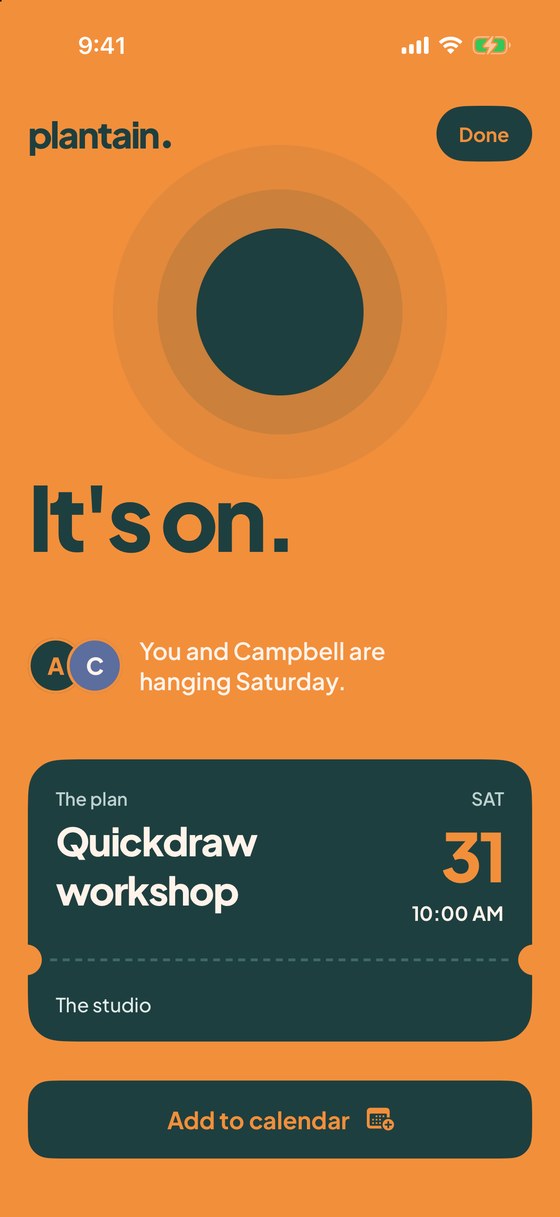
The It's on screen: a peach screen, the words It's on, You and Campbell are hanging Saturday, and the plan, Quickdraw workshop, with its date.

Both of you

The screen lights up the moment anyone is down.

Found something good?

Don’t just like it. Share it.

You see a great event and tap the heart so you can find it later. You never do. Weeks on, you scroll back through your likes and it already happened. Share it to Plantain instead, and the plan starts while you’re still looking at it.

  1. 1

    You spot it

    A flyer in your feed. This is where you’d usually double-tap and hope.
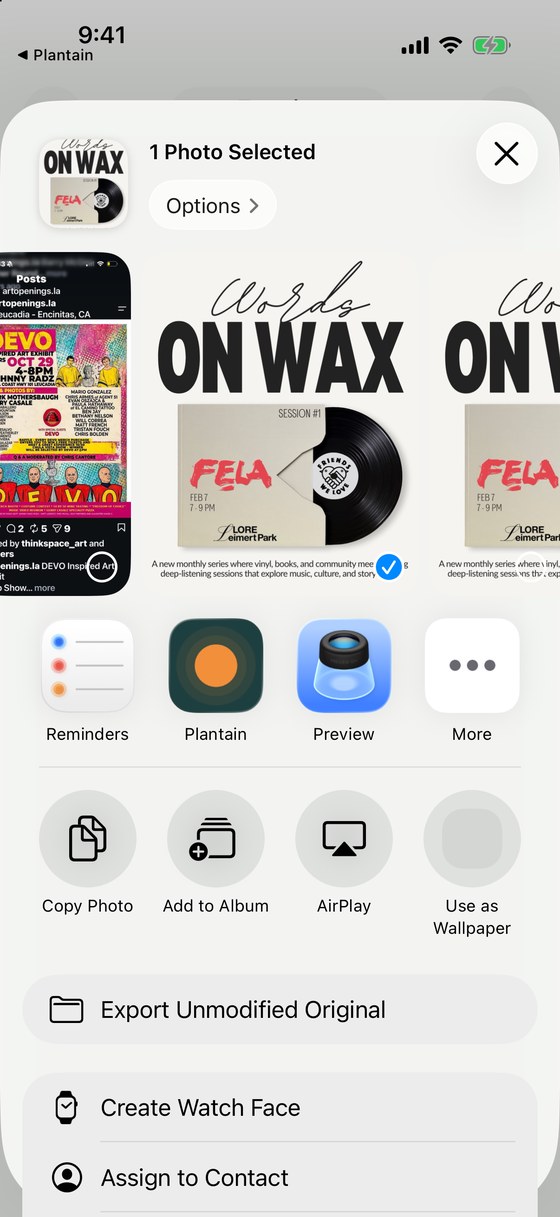
  2. The iPhone share sheet with the Words on Wax flyer selected and Plantain in the row of apps.
    2

    Share it to Plantain

    Tap share, then Plantain. It works from Instagram, Safari, Photos, or anywhere with a share button.
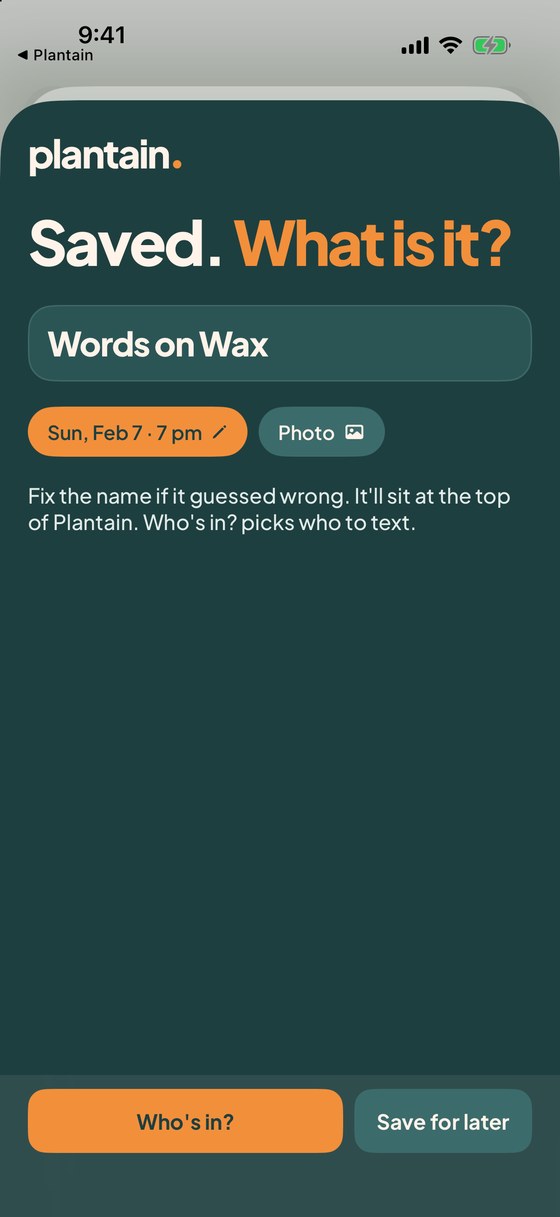
  3. The Plantain share screen: Saved, what is it, with the name Words on Wax and the day Sun, Feb 7 at 7pm filled in, and two buttons, Who's in and Save for later.
    3

    hangs reads it

    The name, day and time come off the flyer, right on your phone. Fix anything in a tap.
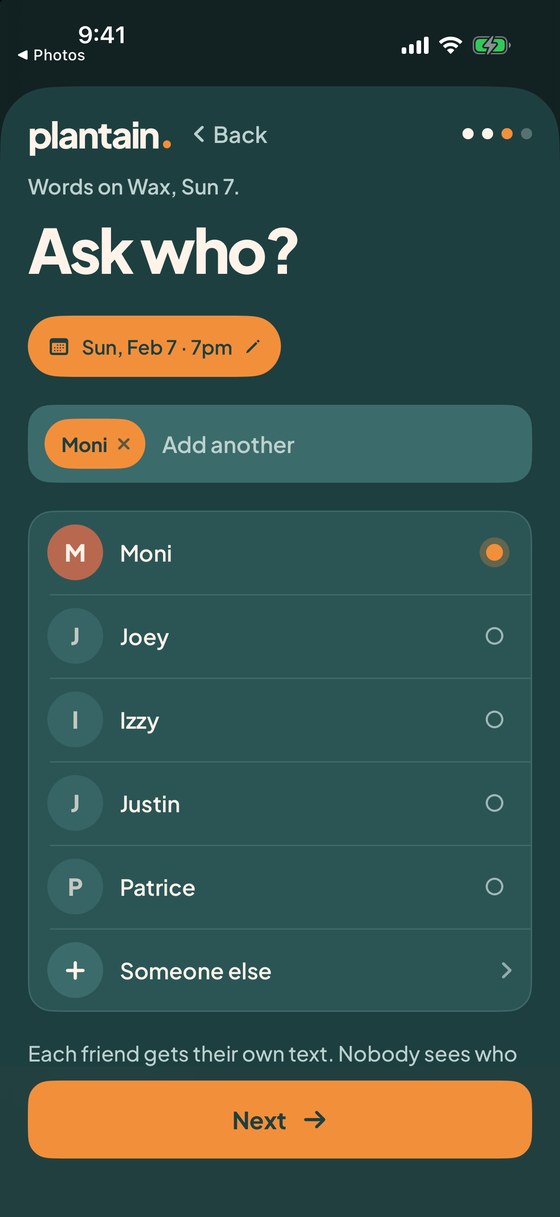
  4. Ask who: Words on Wax, Sun, Feb 7 at 7pm, with Moni chosen from a list of friends.
    4

    Ask who

    Tap the friends you want there. Each one gets their own text.
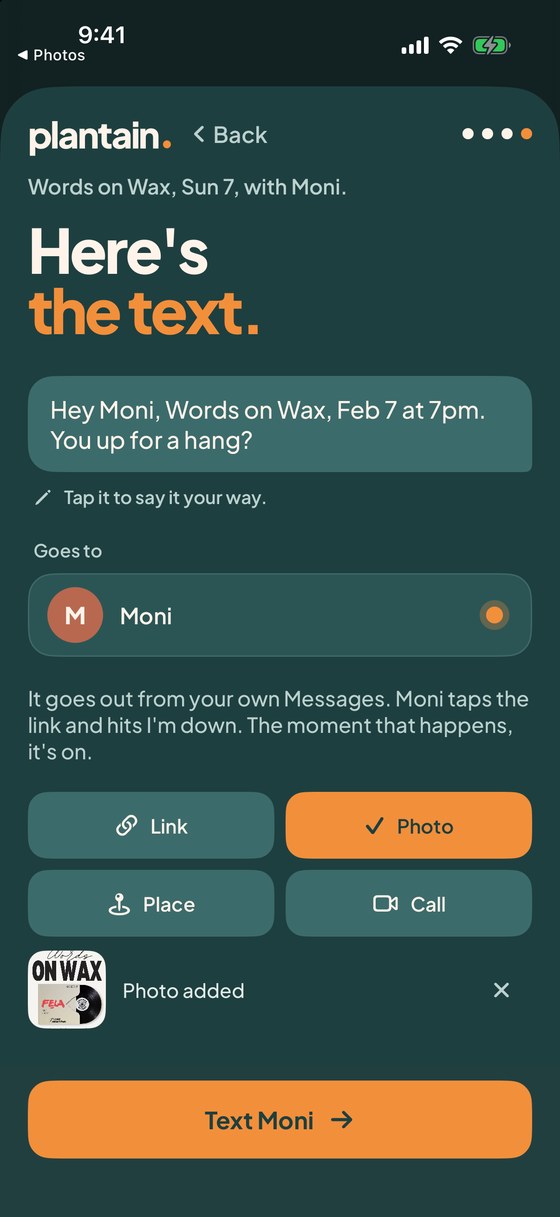
  5. Here's the text: Hey Moni, Words on Wax, Feb 7 at 7pm. You up for a hang? with the flyer added as a photo and a Text Moni button.
    5

    Here’s the text

    It’s already written and the flyer is attached. It goes out from your own Messages.
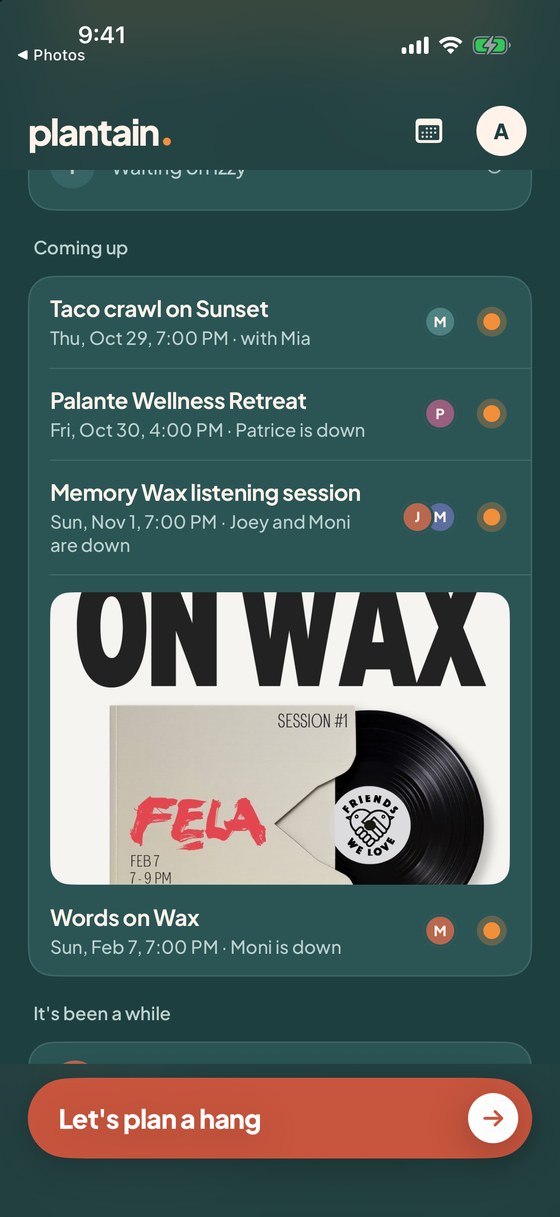
  6. The Plantain home screen with Words on Wax on Sun, Feb 7 in the Coming up list, and Moni is down.
    6

    It lands on your dashboard

    Moni taps “I’m down,” the light comes on, and there it is beside the rest of your week.

Not sure yet?

Tap “Save for later.” It waits under “You saved these.” On Thursday evening Plantain brings your weekend saves back with one question: who’s in? That’s your reminder, and it works for anything you find, not just flyers.

Your calendar, too

See your whole life next to your hangs.

Know what’s free before you ask, and what’s coming before it sneaks up on you.
  • Add any calendar on your phone: iCloud, Google, Outlook, work, family.
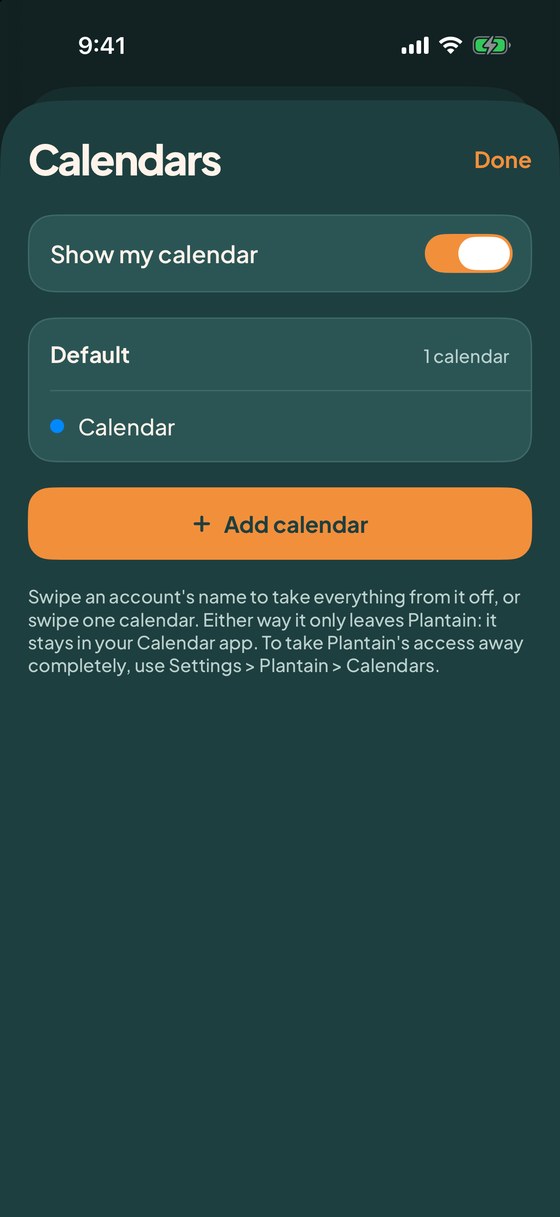
  • Choose which ones show. Take one off whenever you like, or switch the lot off with one toggle.
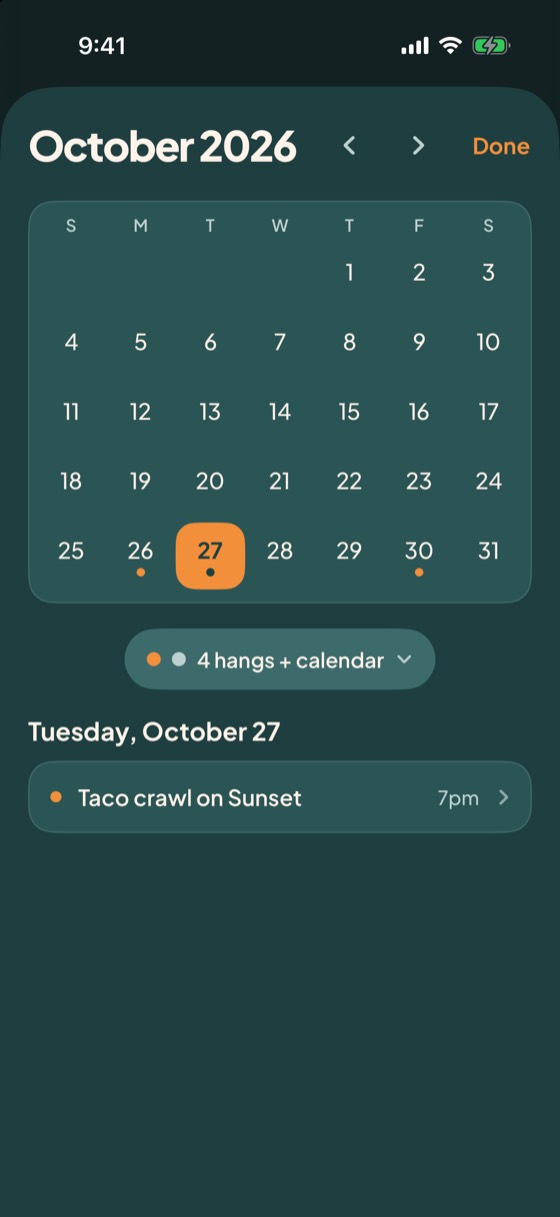
  • Show both, only hangs, or only your calendar. A sun dot marks a hang and a quiet dot marks everything else.
  • Tap any day to see what’s on it. It’s read on your phone, and nothing is uploaded.
The month view for October 2026, with sun dots on days that have a hang, and Tuesday the 27th selected with Taco crawl on Sunset listed underneath.
The calendars screen: Show my calendar switched on, one calendar listed under Default, and an Add calendar button.

Everything in it

Small on purpose. Complete enough to work.

No feed. No profiles. No chat. Just the loop that gets friends to the same place at the same time.

Plans in a few taps

The shortest path from an idea to a text.

  • Start from a pill: coffee, tacos, dinner, drinks, a walk, a hike, a movie, pickleball, a call.
  • Tonight, tomorrow, the weekend or any day. The time is one tap.
  • Add a link, a place or a photo, so the text looks like an invitation.
  • Pick friends from your list, or search your contacts by name.
  • See the exact text before it goes, and say it your own way.

“I’m free,” no plan needed

Offer the time first. Sort out the what together.

  • Tap “I’m free,” then a day and morning, afternoon or evening.
  • “I’m free Saturday afternoon. Want to hang out?” goes out as a text.
  • Friends who are in say so. No clock times to argue about.
  • Later, “Plan it” turns it into a listening session at 7pm, and Plantain tells everyone who’s in.

Save what you find

Hundreds of things happen in your city. Keep the good ones.

  • Share a post, flyer or link from Instagram, Safari or anywhere, and tap Save for later.
  • It reads the flyer on your phone and fills in the name, day and place.
  • Fix anything it got wrong with Edit. Nothing is saved to a server.
  • Thursday evening, one nudge lists this weekend’s saves: “Who’s in?”
  • One tap on “Who’s in?” turns a save into a plan.

Friends answer in one tap

The page your friends open from your text.

  • It opens in the browser. No app to install, no account to make.
  • “I’m down” or “Not this time.” A no is quiet and costs nothing.
  • “Can’t Sunday, but these work”: friends offer other days, and you move it with a tap.
  • “2 friends are already down” shows a count, never names.
  • “What else your friends are up to” shows only hangs they were invited to.

Know where it stands

See who’s in without chasing anyone.

  • A push the moment a friend is down: “Joey’s down.”
  • Down, waiting and not texted yet, for everyone you asked.
  • A quiet friend gets a one-tap nudge a day later, and you get a reminder to send it.
  • Add friends after the first yes. Only the new ones get texted.
  • The morning of: “Joey’s still in. Quickdraw workshop is at 10am.”
  • Add to calendar and directions, and FaceTime, Zoom or Meet for friends far away.

Keep the habit going

The point is more hangs, not more app.

  • “Did it happen?” the next morning, then “Do it again” with the same crew.
  • “It’s been a while” brings back the friends you haven’t seen.
  • “Not sure what?” asks a few friends what’s going on this weekend.
  • A month view shows your hangs beside your calendar. It stays on your phone.
  • A home screen widget shows your next hang and your saves.

Built around one rule

Your plans are for the people you pick.

Read it in plain English →
  • You only ever see hangs you were invited to. Never friends of friends.
  • Every text goes out from your own Messages. Plantain never texts anyone for you.
  • No ads, no trackers, and no tracking of what you tap. Not in the app, not on your friends’ pages.
  • Your contacts are searched on your phone and never uploaded. Only the people you pick leave it.
  • Plans are deleted 90 days later. Delete your account and everything of yours is erased right away.

Questions

The short answers.

Do my friends need the app?

No. They tap the link in your text and answer in the browser. No app, no account, on any phone.

Does Plantain text people for me?

Never. Every text goes out from your own Messages, one per friend, so it sounds like you and replies stay private.

What if nobody’s down?

Then nothing happens, and nobody is on the hook. You can nudge a quiet friend, add more people, or float a different day.

Who can see my plans?

Only the friends you picked for that plan. Nobody else, ever, and not friends of friends.

Do I need an account?

You sign in with your phone number and a text code. Your friends never sign in. You can also look around with sample hangs first, no sign-up.

Is there an Android app?

iPhone first. Friends on any phone can still answer from the link in your text.